

Many people feel confused when they first try SFM Compile. The tools, file formats, and error messages can seem difficult to understand. If your custom model refuses to work, you are not alone. Almost every beginner faces the same challenge.
This guide will explain SFM Compile in simple and easy English. You will learn what it is, how it works, the tools you need, and the steps to compile models successfully. We will also cover common errors, useful tips, and beginner-friendly practices so you can build and use custom assets with confidence.
Understanding SFM Compile
SFM compile is the process of converting raw 3D assets into files that Source Filmmaker (SFM) and the Source Engine can read and use. Models created in formats like SMD, DMX, and texture files are compiled into MDL files before they become usable inside SFM.
The Source Engine requires compiled files because they contain optimized information for rendering, animations, physics, collision detection, and materials. During compilation, different tools process your model, skeleton, textures, and animation data into a format that SFM understands.
If you plan to import custom characters, props, weapons, or animations from programs such as Blender or Maya, learning the SFM compile process is essential. Without compiling, your custom assets cannot be loaded correctly in Source Filmmaker.
Essential Software for SFM Compile
A successful SFM compiler depends on several important applications, each serving a different purpose during the workflow.
Most creators use a combination of a model compiler, QC editor, decompiling tool, and 3D modeling software. Together, these applications handle everything from creating assets to testing the finished model inside SFM.
Keeping these tools updated and properly configured helps reduce compile errors while improving compatibility with Source Filmmaker and the Source Engine.
Studiomdl Command-Line Tool
Studiomdl is the official model compiler used by the Source Engine. Its primary job is to convert source files, including SMDs and QC scripts, into compiled MDL models.
During compilation, Studiomdl processes model geometry, bones, hitboxes, animations, and materials based on the instructions written in the QC file. It produces several output files, including MDL, VVD, and VTX.
Although it operates through the command line, learning the basic Studiomdl commands gives users better control over compiling, troubleshooting, and optimizing models.
Crowbar Compilation Tool
Crowbar is one of the most widely used utilities in the Source Engine community. It functions as both a compilation assistant and a model decompiler.
Many users prefer Crowbar because it provides a simple graphical interface that works with Studiomdl. Instead of typing lengthy command-line commands, users can manage compile settings through easy-to-use menus.
Crowbar also allows creators to decompile existing models, making it easier to study professional projects and understand how QC files are written.
3D Modeling Software
Every SFM compile project starts inside a 3D modeling application. Popular options include Blender, Autodesk Maya, and 3ds Max, which are used to design models, create rigs, and build animations.
Blender is especially popular because it is free, feature-rich, and supports several plugins for exporting Source Engine-compatible files.
The quality of the original model plays a major role in compilation success. Proper topology, clean rigging, and optimized polygon counts help avoid many common errors.
Text Editor Requirements
QC files control nearly every stage of the compilation process, making a reliable text editor an important tool.
Programs like Notepad++, Visual Studio Code, and Sublime Text offer useful features such as syntax highlighting, file organization, and easier editing.
A clean and well-written QC file makes the compile process more reliable. Since the compiler follows every instruction inside the QC file, even a small mistake can cause the build to fail.
SFM Compile Process
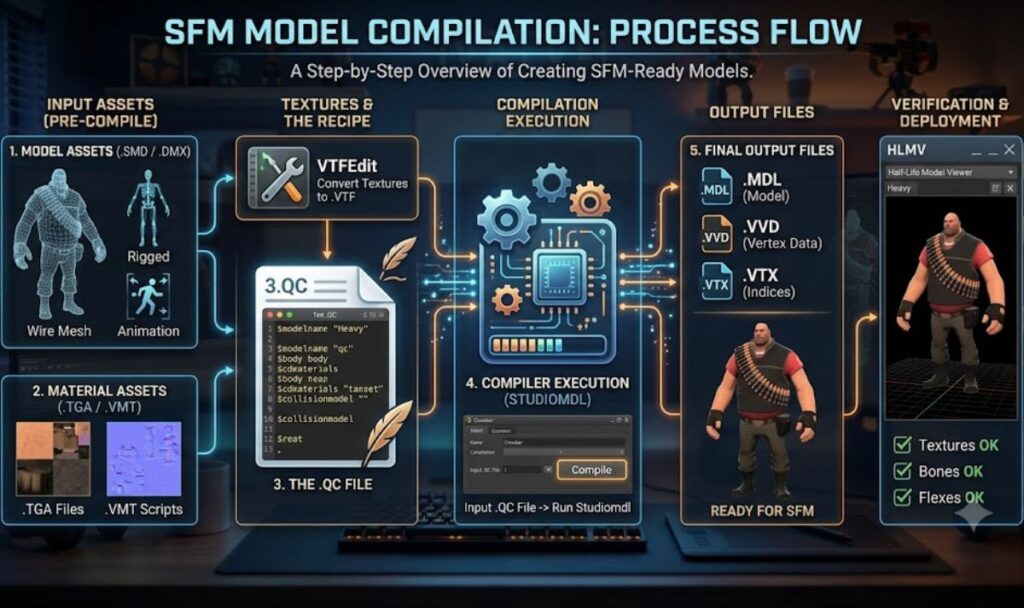
The SFM compile workflow follows several important stages. Missing one step can result in broken animations, missing textures, or failed model compilation.
A standard workflow includes preparing assets, writing the QC file, running the compiler, and checking the finished output. Every stage contributes to a successful model.
Learning this process makes troubleshooting much easier and helps maintain organized project files.
Asset Preparation
The first stage is preparing your assets. Models should have clean geometry, correctly unwrapped UV maps, and finished textures before exporting.
You should also verify skeletal rigs, animations, and material assignments during this stage. Fixing problems early saves time later in the workflow.
Once everything is ready, export the model into Source-supported formats such as SMD or DMX, which will be used during compilation.
Creating QC Files
A QC file serves as the instruction guide for the compiler. It specifies important details such as the model name, material locations, animation sequences, body groups, hitboxes, and additional settings.
Well-organized QC files make compiling more reliable and reduce the amount of troubleshooting required. Many beginners learn by studying existing QC files and adapting them to their own projects.
Since every model has different requirements, understanding QC syntax is one of the most valuable skills for anyone working with the SFM compile process.
Running the Compilation Process
After preparing the assets and writing the QC file, the next step is to compile the model. During this stage, the compiler reads the QC script and converts all referenced files into Source Engine-compatible formats.
Many creators use Crowbar to launch Studiomdl, as it provides a simple interface for managing compilation settings. While the process runs, the compiler generates log files that report warnings, errors, and other useful information.
Checking these logs carefully helps identify problems such as missing files, incorrect paths, material issues, or skeleton mismatches before importing the model into Source Filmmaker.
Verifying the Results
Once compilation is complete, the model should be tested inside Source Filmmaker to confirm everything works as expected. This includes loading the model, playing animations, and checking textures.
Inspect the mesh, materials, bone structure, and animation performance for any unusual behavior. If something appears incorrect, the issue is often related to the source files or QC settings.
Testing every compiled asset thoroughly helps avoid larger problems later during animation or production.
Best Practices for SFM Compile
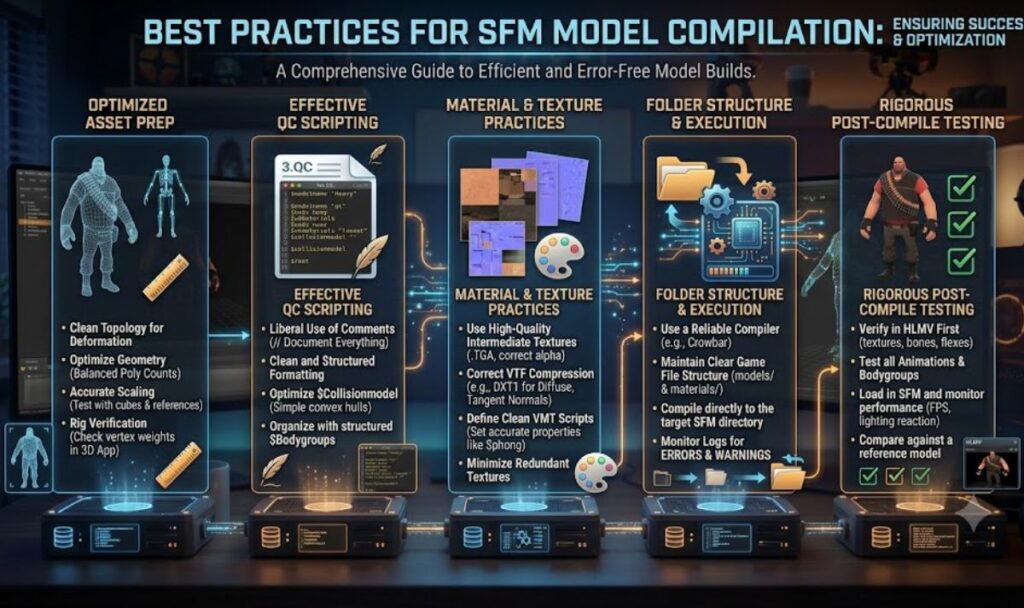
Keeping project folders organized is one of the best ways to avoid compilation issues. Clear folder structures and consistent file names reduce confusion and prevent broken file paths.
It’s also a good idea to keep backup copies of models, textures, and QC files. Having previous versions makes it easier to recover your project if something goes wrong.
Another helpful habit is compiling your work regularly instead of waiting until the project is finished. Frequent testing allows you to catch and fix errors early.
Common SFM Compile Errors
One of the most common problems is missing textures. Incorrect material paths often cause models to display the familiar purple-and-black checkerboard pattern inside Source Filmmaker.
Animation issues frequently occur when the skeleton exported from the modeling software does not match the structure expected by the QC file. This can generate compiler warnings or stop the build completely.
Incorrect file paths are another frequent cause of failed compilations. Even a small directory mistake can prevent the compiler from locating required files.
Advanced SFM Compile Techniques
Experienced creators often use advanced features such as body groups, Level of Detail (LOD) models, and animation blending to improve both flexibility and performance.
LOD models automatically switch to lower-polygon versions when viewed from a distance, helping maintain smooth performance in large scenes.
More advanced workflows may also include custom physics, multiple animation sequences, and procedural materials, allowing greater control over how assets behave inside Source Filmmaker.
SFM Compile Workflow for Beginners
New users should first learn the basic workflow before moving on to advanced techniques. Understanding exporting, QC scripting, and simple compilation builds a solid foundation.
Watching tutorials and reading community guides can make learning much easier. Many experienced creators started by editing existing models before creating their own.
Most importantly, be patient. Compile errors are a normal part of learning and happen to almost everyone working with Source Filmmakers.
Start with a Simple Low-Polygon Model
Small projects are much easier to compile and troubleshoot than detailed character models. A basic prop or static object is an excellent place to begin.
Simple models require fewer materials, bones, and animations, which means fewer opportunities for errors. They also compile more quickly, making testing faster.
Starting small helps beginners gain confidence before moving on to larger and more complex projects.
Install and Organize Your Tools
Before compiling your first model, install all the required software and make sure every file path is set correctly.
Create separate folders for exported models, textures, QC scripts, and project files. A clean folder structure improves workflow and reduces path-related errors.
Good organization also makes future projects much easier to manage as your asset collection grows.
Write Your First QC File Manually
Creating a QC file by hand is one of the best ways to understand how the compilation process works. Even a basic script teaches you how the compiler reads instructions.
Begin with simple settings such as the model name, body definition, and material folder. As you gain experience, you can add more advanced options.
Learning QC scripting firsthand also improves your ability to troubleshoot compile errors.
Compile, Test, and Improve
Successful SFM compile projects are built through continuous testing and refinement. It’s uncommon for a model to compile perfectly on the first try.
Compile your asset regularly, review the compiler logs, and test the model immediately inside Source Filmmaker. Making small fixes along the way prevents larger problems later.
This step-by-step approach is the same workflow used by many professional game artists and asset creators.
Learn from Decompiled Models
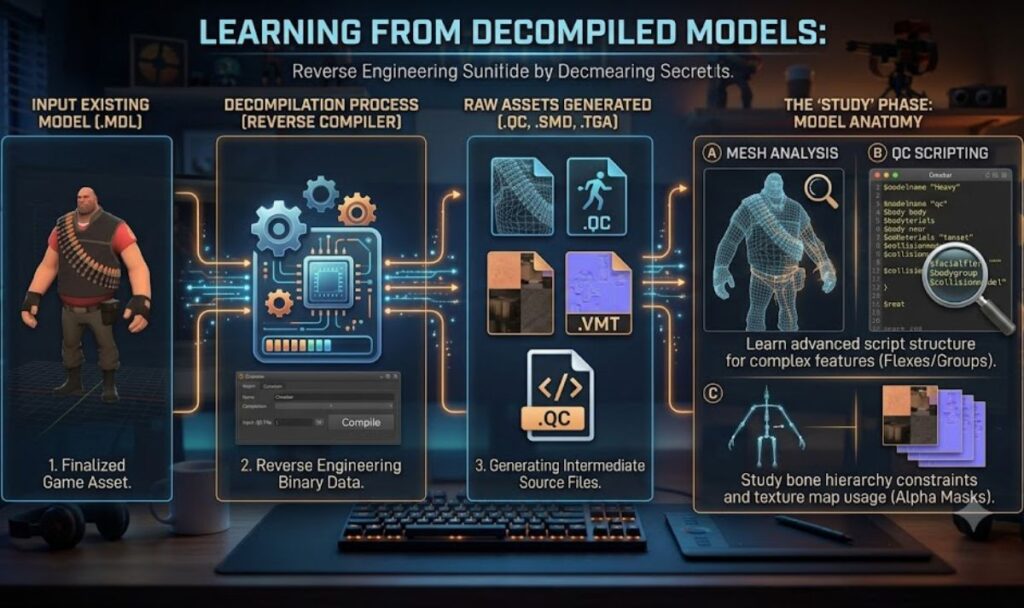
Studying decompiled models is an excellent way to improve your skills. Their QC files and folder structures demonstrate techniques that have already been proven to work.
By examining existing assets, you can better understand animation setups, material paths, and body group configurations.
Using reference models responsibly is a great way for beginners to learn standard Source Engine practices more quickly.
FAQ’s
What Does SFM Compile Mean?
SFM Compile is the process of converting 3D models into files that Source Filmmaker can use. SFM Compile prepares custom assets, textures, and animations for smooth performance.
How Many GB Is SFM?
SFM Compile itself does not require a fixed size, but Source Filmmaker needs around 15–20 GB of free storage. Extra SFM Compile projects may require more space.
What Is Build vs. Compile?
In SFM Compile, compiling converts source files into usable model files, while building completes the entire project. SFM Compile is one important step within the build process.
Is It Hard to Animate in SFM?
Learning animation takes practice, but beginners can improve with simple projects. SFM Compile helps prepare working models, making animation easier as your skills continue growing.
Is SFM Harder Than Blender?
SFM Compile and Source Filmmaker are generally easier for animation, while Blender offers more advanced features. Blender has a steeper learning curve than SFM Compile workflows.
Conclusion
SFM Compile is an important step for anyone creating custom models in Source Filmmaker. It changes raw files into game-ready assets that work correctly inside the Source Engine. Learning SFM Compile may seem difficult at first, but it becomes easier with practice. Using the right tools, writing clean QC files, and checking compiler logs can help you avoid common mistakes. A simple workflow also saves time and improves your results.
As your skills grow,SFM Compile will become a natural part of every project. Keep your files organized, test your models often, and fix small issues early. Whether you create characters, props, or animations, SFM Compile helps you build reliable assets with confidence. Follow the best practices, learn from each project, and continue improving. With patience and regular practice, SFM Compile will help you create high-quality Source Filmmaker content successfully.
